
For most people, the best IPTV player for Windows in 2026 is IPTV Smarters Pro. It’s free, it runs on both Windows PC and Mac, and it supports Xtream Codes and M3U logins with a full TV guide. If you only have an M3U link, VLC Media Player is the fastest free option. Below, we compare 5 popular players and show you exactly how to set each one up.
Quick answer: best IPTV players for PC and Mac
- Best overall: IPTV Smarters Pro (Windows + Mac, free)
- Best free player for M3U links: VLC Media Player (Windows + Mac)
- Best Windows-only app: MyIPTV Player (Microsoft Store)
- Best open-source player: IPTVnator (Windows, Mac, Linux)
- Best for a full media center: Kodi + PVR IPTV Simple Client
Remember, an IPTV player is just the app. It doesn’t come with channels. You need an active IPTV subscription or a playlist you have the rights to use.
Key Takeaways
- The right Windows IPTV player depends on your login type. Use IPTV Smarters Pro or IPTVnator for Xtream Codes, and any of the 5 players for M3U links.
- Download IPTV Smarters Pro for PC only from the Downloads section of the official Smarters website, not from mirror sites.
- On Mac, use the Smarters desktop app, VLC, IPTVnator, or Kodi. Check the developer before buying any App Store app with “Smarters” in its name.
- All 5 players are free. Only the IPTV service costs money.
- Use Ethernet for HD and 4K streams. Most buffering on laptops comes from weak Wi-Fi.
Best IPTV Player for Windows and Mac: Comparison Table
All 5 players are free to download. The table shows which logins each one supports and who it suits best.
| Player | Windows | Mac | Xtream Codes | M3U | TV guide (EPG) | Best for |
|---|---|---|---|---|---|---|
| IPTV Smarters Pro | Yes | Yes | Yes | Yes | Yes | Most users; a TV-box style app |
| VLC Media Player | Yes | Yes | No | Yes | No | Quick M3U playback and testing links |
| MyIPTV Player | Yes | No | No | Yes | Yes | Windows users who want a simple Store app |
| IPTVnator | Yes | Yes | Yes | Yes | Yes | Open-source fans and Linux users |
| Kodi + PVR IPTV Simple Client | Yes | Yes | Via add-ons | Yes | Yes | Users who want one media center for everything |
How to Choose the Right IPTV Player for Your PC
The right choice depends on the login your provider sends and how you like to watch.
- Check your login type. Xtream Codes (server URL, username, password) works best in IPTV Smarters Pro or IPTVnator. An M3U link works in all 5 players. Not sure which one you have? Our guide to IPTV M3U vs MAC logins explains the formats.
- Decide if you need a TV guide. If you want to see what’s on now and next, skip VLC.
- Pick your operating system. MyIPTV Player is Windows only. The other four work on both Windows and Mac.
- Think about ease of use. Smarters and MyIPTV take about 5 minutes to set up. Kodi takes longer but does more.
- Check your internet speed. Plan for at least 10 Mbps for HD and 25 Mbps for 4K, on any player.
1. IPTV Smarters Pro: Best Overall IPTV Player for Windows and Mac
IPTV Smarters Pro is the most popular IPTV player for Windows and Mac because it looks and works like a TV box app. It splits your service into Live TV, Movies, and Series, adds a TV guide, and saves several logins in one place.
Key features
- Xtream Codes API and M3U playlist login
- Live TV with EPG, plus separate Movies and Series sections
- Several user profiles in one app
- Choice of built-in player or external player
| Pros | Cons |
|---|---|
| Free desktop app for both Windows and Mac | Must be downloaded from the official site, not the Microsoft Store |
| Clean TV-style layout | Windows or macOS may show a security warning on first install |
| Works with almost every IPTV provider | Copycat apps with similar names cause confusion |
Best for: anyone with an Xtream Codes login who wants a full TV experience on a computer.
How to Install IPTV Smarters Pro on Windows PC
Follow these steps to set up IPTV Smarters Pro on PC with Windows 10 or Windows 11:
- Open the official IPTV Smarters website and go to the Downloads section.
- Click the Windows download option.
- Open your Downloads folder and run the setup file. Its name starts with “IPTVSmartersProSetup”.
- If you see “Windows protected your PC”, click More info, then Run anyway. Only do this for the file from the official site.
- Accept the terms and open the app.
- Choose Login with Xtream Codes API. Enter any name, plus the username, password, and server URL from your provider, then click Add User.
- Only have an M3U link? Choose Load Your Playlist or File URL, paste the link, name it, and click Add User.
- Wait for channels, EPG, and VOD to load, then open Live TV.
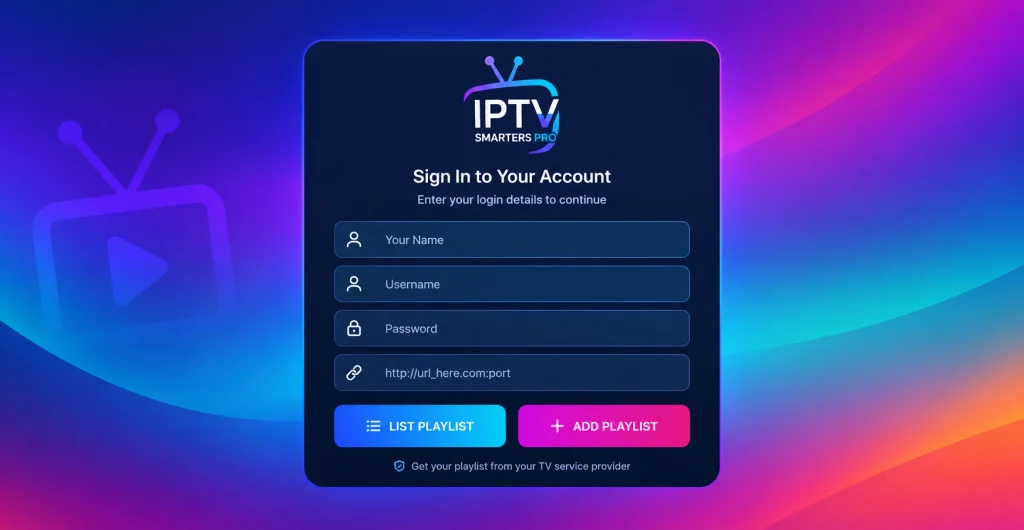
If the app says “authorization failed”, your details or line are the problem, not the player. Our authorization failed fix guide walks you through it.
How to Install IPTV Smarters Pro on Mac
The steps for IPTV Smarters Pro on Mac are almost the same:
- Download the macOS app from the same Downloads section of the official Smarters website.
- Open the downloaded file and drag the app into your Applications folder.
- If macOS says the app can’t be opened, go to System Settings > Privacy & Security and click Open Anyway.
- Log in with Xtream Codes or an M3U URL, the same way as on Windows.
Watch out for copycat apps. Several Mac App Store apps use the Smarters name and come from unrelated developers. For example, “IPTV Smarters Player PRO” is listed by a developer named Paul Kenneth. It is free, with Pro upgrades from $1.99 a week to $49.99 lifetime, and on Mac it needs macOS 15 and an Apple M1 chip or newer. Check the developer name before you pay for any upgrade.
2. VLC Media Player: Best Free Player for M3U Links
VLC is a free, open-source media player from VideoLAN that most people already have. It plays an M3U playlist in seconds, which makes it ideal for testing a new IPTV link.
| Pros | Cons |
|---|---|
| Free, no ads, very lightweight | No TV guide or catch-up |
| Works on Windows, Mac, and Linux | No Xtream Codes login |
| Plays almost any stream format | Switching channels in a long list is slow |
Best for: testing an M3U link or watching a few channels without extra setup.
How to watch IPTV on VLC (Windows and Mac):
- Install VLC from the official VideoLAN website.
- On Windows, click Media > Open Network Stream (Ctrl + N). On Mac, click File > Open Network.
- Paste your M3U URL and click Play.
- Press Ctrl + L (Windows) or Cmd + L (Mac) to open the playlist and switch channels.
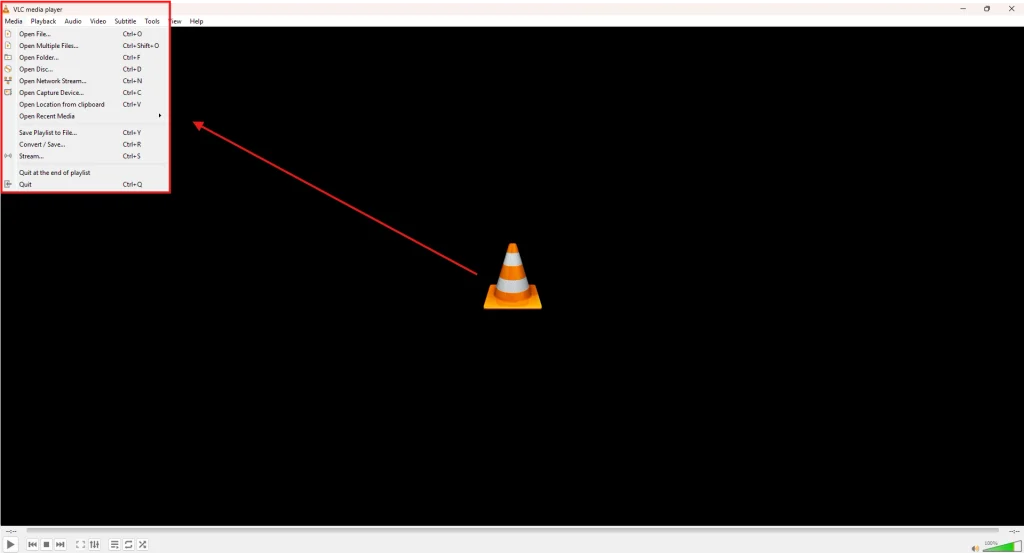
Our IPTV on VLC guide covers more tips, like saving playlists.
3. MyIPTV Player: Best Windows-Only IPTV App
MyIPTV Player is a free Windows IPTV player in the Microsoft Store. According to Windows Report, it supports M3U playlists, an EPG, and channel recording, and requires Windows 10 (build 17763) or later.
| Pros | Cons |
|---|---|
| Installs from the Microsoft Store, so no security warnings | Windows only, no Mac version |
| TV guide and recording | M3U only, no Xtream Codes login |
| Simple, light app | VOD playback relies on VLC |
Best for: Windows users who want a simple Windows IPTV player from a trusted store.
How to set up MyIPTV Player:
- Open the Microsoft Store, search for MyIPTV Player, and click Get.
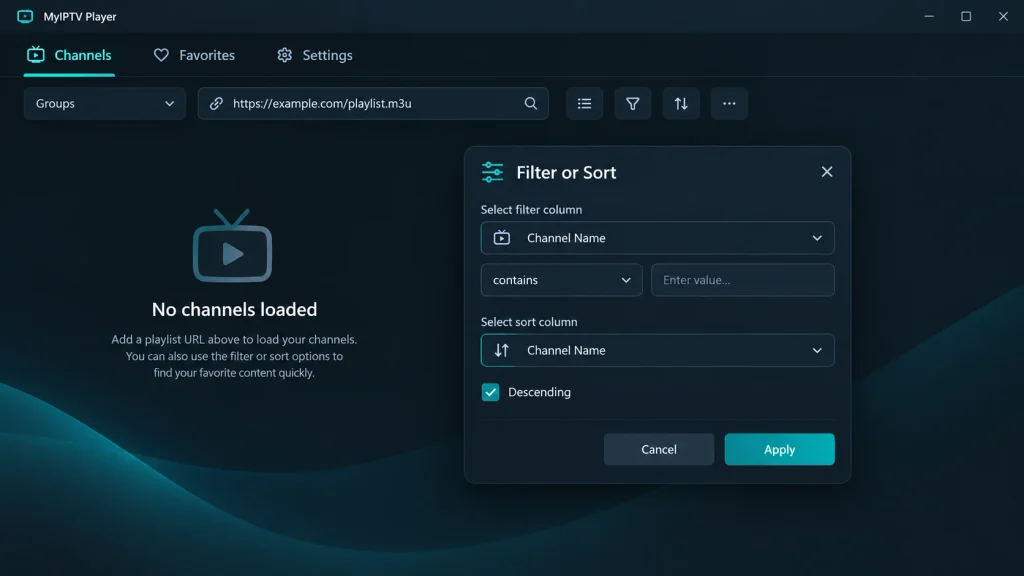
- Open Settings > Add new playlist and EPG source.
- Paste your M3U URL under Remote channel list, name it, and click Add remote list.
- Add your provider’s EPG link, select the playlist, and click Refresh.
4. IPTVnator: Best Open-Source IPTV Player
IPTVnator is a free, open-source IPTV player for Windows, Mac, and Linux. It supports M3U playlists, Xtream Codes, and Stalker portals, with a full EPG grid. The project states that it does not provide any playlists or content.
| Pros | Cons |
|---|---|
| Supports M3U, Xtream Codes and Stalker portals | Smaller community than VLC or Kodi |
| Modern TV guide with timeline view | Installer comes from GitHub, not an app store |
| Free and open source (MIT license) | Fewer extra features than Smarters |
Best for: people who want a clean, open-source player on any desktop system. Linux users can also see our IPTV player for Linux guide.
How to set it up: download the installer for your system from the GitHub releases page, open the app, then add your playlist URL or Xtream login.
5. Kodi: Best Media Center for IPTV
Kodi is a free, open-source media center for Windows and Mac. It plays IPTV through the official PVR IPTV Simple Client add-on and can also manage your local movies and music.
| Pros | Cons |
|---|---|
| Full TV guide and recording options | Takes the longest to set up |
| One app for IPTV and your own media | The interface can feel heavy on older PCs |
| Free and open source | Unofficial add-ons can be risky |
Best for: users who want one media center for everything.
How to set up IPTV on Kodi:
- Install Kodi from the official website.
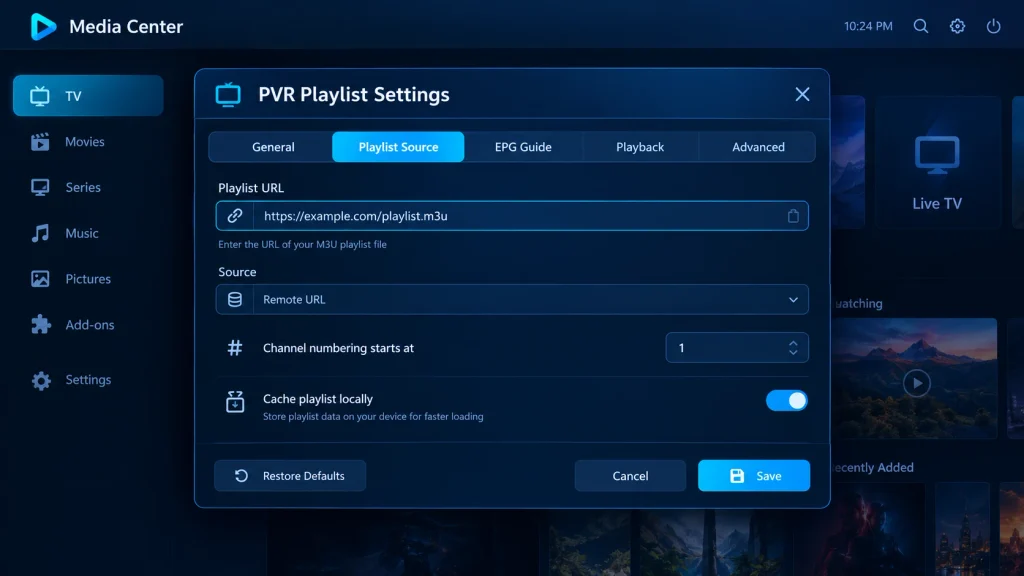
- Go to Add-ons > Install from repository > PVR clients and install PVR IPTV Simple Client.
- Open the add-on settings, paste your M3U URL and EPG link, then restart Kodi.
- Open TV from the home menu to watch.
What About TiviMate on PC?
TiviMate has no Windows or Mac version. Some people run it in an Android emulator, but IPTV Smarters Pro or IPTVnator gives a similar experience without that extra step. Read our TiviMate guide to learn more.
Best Free IPTV Player for Windows
Every player in this guide is a free IPTV player for Windows. None of them charge for the app itself, and none include channels. Here’s the quickest pick by need:
- Free with Xtream Codes: IPTV Smarters Pro or IPTVnator
- Free with no setup: VLC Media Player
- Free from the Microsoft Store: MyIPTV Player
- Free and fully open source: IPTVnator, VLC or Kodi
Be careful with “free IPTV” apps that come with built-in channels. They often carry malware or unlicensed streams. A safe free player plus a paid service you can test first is the better route. See our list of IPTV free trials to try a service before you pay.
Common IPTV Player Problems on PC and Mac (and Fixes)
| Problem | Likely cause | Fix |
|---|---|---|
| “Authorization failed” in Smarters | Wrong username, password, or server URL, or an expired line | Re-enter the details exactly as sent, or ask your provider to check the line. |
| Channels load but won’t play | Server down or wrong stream format | Switch the player in Smarters settings, or test the link in VLC. |
| Buffering or freezing | Weak Wi-Fi or ISP throttling | Use Ethernet, lower the quality, or use a VPN for IPTV. |
| Empty TV guide | Missing or outdated EPG link | Add your provider’s EPG URL and refresh. |
| App won’t install | SmartScreen (Windows) or Gatekeeper (Mac) blocked it | Use “Run anyway” or “Open Anyway” only for files from the official site. |
Is It Legal to Use an IPTV Player on a PC?
Yes. IPTV player apps are legal because they only play the streams you add. What matters is where those streams come from. Unlicensed IPTV is a big market: an EU Intellectual Property Office study estimated 13.7 million EU users in 2018. Check your provider’s terms and your local laws, and read our guide to legal IPTV services. A VPN protects your privacy, but it doesn’t make unlicensed streams legal.
FAQ
-
What is the best IPTV player for Windows?
IPTV Smarters Pro is the best IPTV player for Windows for most people. It’s free and supports Xtream Codes, M3U, EPG, and VOD in one app. VLC is the simplest option for M3U links, and IPTVnator is the best open-source choice.
-
What is the best free IPTV player for Windows 11?
IPTV Smarters Pro, VLC, MyIPTV Player, IPTVnator, and Kodi all run free on Windows 11. Only the IPTV subscription costs money.
-
Can I use IPTV Smarters Pro on PC without BlueStacks?
Yes. IPTV Smarters Pro has its own Windows desktop app on the official Smarters website, so you don’t need BlueStacks or another Android emulator.
-
Is IPTV Smarters Pro available in the Microsoft Store?
Get the IPTV Smarters Pro Windows app from the Downloads section of the official Smarters website. If you want a Store app, MyIPTV Player is available in the Microsoft Store.
-
Does IPTV Smarters Pro work on Mac?
Yes. Download the macOS version from the official Smarters website. Be careful with App Store apps that use the Smarters name, because some come from unrelated developers.
-
Does VLC support EPG for IPTV?
No. VLC plays M3U channels but has no TV guide. Use IPTV Smarters Pro, MyIPTV Player, IPTVnator, or Kodi if you want an EPG.
-
Do IPTV players come with channels?
No. A Windows IPTV player is just the app. You add channels with an M3U link or Xtream Codes login from your IPTV provider.
Final Verdict: Which IPTV Player Should You Use?
For most people, IPTV Smarters Pro is the best IPTV player for Windows and Mac. It’s free, it handles Xtream Codes and M3U, and it feels like a TV box. Use VLC for a quick M3U test, MyIPTV Player if you prefer a Microsoft Store app, IPTVnator for a free open-source option, and Kodi if you want one media center for everything.
Need channels for your player? Nixon IPTV works on Windows, Mac, Smart TVs, Firestick, and phones, with 15,000+ live channels and a 24-hour free trial. You can also compare options in our best IPTV providers guide, or see our full best IPTV player roundup for other devices.