
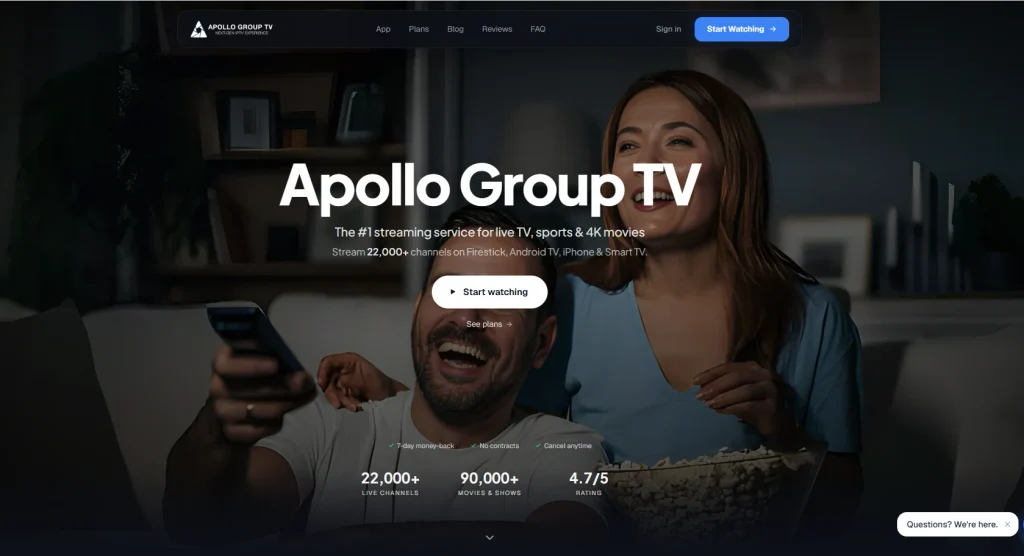
Apollo Group TV positions itself as a large, low-cost internet protocol television (IPTV) service for live channels, sports, pay-per-view events, movies, and series. Its website advertises 22,000+ live channels, 90,000+ movies and shows, content from 45+ countries, 4K playback, electronic programme guide (EPG) data, recordings, multi-profile support, and access on up to five devices.
That sounds compelling for cord-cutters. However, a responsible Apollo Group TV review must separate what the provider claims from what can be independently verified. The public site does not provide a conventional channel-by-channel licensing directory, and its DMCA disclaimer says it is not affiliated with broadcasters and does not host or broadcast channels directly. The result is a service that may offer impressive breadth and attractive pricing, but also requires more legal, privacy, and reliability due diligence than a mainstream licensed streaming platform.
Quick verdict
| Category | Assessment |
| Quick rating | 3.0/5 for value potential; not a licensing endorsement |
| Best for | Experienced IPTV users who understand playlist-based streaming and local copyright rules |
| Advertised price range | $24.99 for 1 month to $149.99 for 12 months; annual equivalent is $12.49/month |
| Advertised strengths | Large catalogue, sports focus, EPG, 4K/HDR claims, five-device access, live support |
| Main weaknesses | Content rights are not independently established, channel totals are marketing claims, and performance may vary by location, device, network, and source stream |
| Bottom line | Consider only after checking legality in your country, payment/refund terms, privacy practices, and a specific channel lineup. Do not assume a VPN makes unlicensed viewing legal. |
What is Apollo Group TV?
Apollo Group TV is an IPTV subscription marketed as an alternative to cable and conventional live-TV bundles. IPTV itself is simply the delivery of television over an internet connection. That technology is legal and is used by established services, broadcasters, and telecom companies. The legal question is different: does the provider have permission to distribute the particular channels, films, sports broadcasts, and other programmes it offers?
Apollo’s homepage says the service provides live television and video on demand (VOD) across the United States, United Kingdom, Canada, Latin America, Europe, the Middle East and North Africa, and Asia. It also highlights sports such as NFL, NBA, soccer, UFC, boxing, MLB, NHL, tennis, golf, Formula 1, and MotoGP.
Those are provider statements, not an independently audited channel list. Before paying, readers should request the exact channels and events they care about, confirm whether the list is current, and read the refund policy in full.
For readers who are new to the technology, the what is IPTV guide on Nixon IPTV explains the difference between the delivery method and the content provider.
Features and live-TV experience
Channel range and sports coverage
The headline appeal is scale. Apollo advertises more than 22,000 live channels, with more than 4,000 described as HD in the plan cards, plus sports and PPV coverage. The site names networks including ESPN, NFL Network, NBA TV, Sky Sports, beIN Sports, DAZN, MLB Network, and TNT Sports.
The important qualification is that a large channel count does not automatically mean reliable access to every named network or event. IPTV lists can contain duplicates, regional feeds, temporary links, time-zone variants, or channels that disappear without notice. Sports availability can also change rapidly because rights differ by country and season.
If your priority is a particular league, compare the advertised lineup with an official rights holder in your territory. A service that claims to carry a channel is not proof that it is authorised to do so.
VOD library
Apollo advertises 90,000+ movies and TV shows. The site does not publish a complete, independently verifiable catalogue or a clear update log. Therefore, treat the total as a promotional estimate rather than a guaranteed inventory.
A useful pre-purchase test is to ask support for several specific titles, including one recent release, one older film, and one series with multiple seasons. Also ask whether VOD metadata, subtitles, audio tracks, and playback quality are consistent across devices.
Video quality, buffering, and uptime
The provider advertises HD and 4K/HDR streaming, adaptive bitrate delivery, multi-CDN infrastructure, and “anti-freeze Technology” playback. These features can improve resilience when implemented well, but they cannot guarantee smooth viewing. Buffering depends on the source feed, server load, route to the viewer, home Wi-Fi, device capability, and the quality of the player.
There is no public third-party uptime report or reproducible test data in the materials reviewed for this article. I would therefore avoid presenting “buffer-free,” “99.9% uptime,” or “every game” as facts. Test the service during the exact hours and events that matter to you, and avoid paying for a long term before confirming basic reliability.
For general troubleshooting, Nixon IPTV’s guide to adaptive bitrate streaming provides useful background. Its IPTV buffering guide is also a practical starting point for checking Wi-Fi, device storage, playback settings, and network congestion.
EPG, recordings, and profiles
Apollo’s public page lists a full EPG, live sports scores, recordings, up to five profiles, a kids mode, synchronised “continue watching,” custom playlists, and rich title pages with cast information, IMDb details, trailers, and similar titles.
These are attractive usability features, but the page does not specify recording storage limits, retention periods, simultaneous-stream rules, parental-control scope, or whether all metadata is available in every region. Those questions should be answered before subscribing if the service is intended for a family or multiple screens.
App compatibility and the Startup Show app
Apollo says its service works on Fire TV/FireStick, Android TV, Smart TVs, iPhone, iPad, and other devices. Depending on the account and delivery method, users may be given credentials, an app, a downloader code, or an M3U playlist.
Startup Show is a player, not a content provider. Its Google Play listing says users add their own M3U playlists, with EPG support, remote playlists, live and VOD playback, casting, and a built-in player. The listing also states that Startup Show does not supply media, has no affiliation with third-party providers, and does not endorse copyright-protected streaming without permission.
That distinction matters. Installing Startup Show does not validate Apollo’s content rights, and Startup Show’s availability does not prove that Apollo is an authorised provider.
Other player options may suit different devices. For example, TiviMate is listed as a media player intended for Android TV and says users add their own playlists. Nixon IPTV’s best IPTV player guide and IPTV player guide for iOS can help readers compare interfaces and platform support without confusing a player with a subscription service.
Apollo Group TV setup on FireStick and Android TV
The safest setup process is to use only instructions supplied through Apollo’s verified customer area and official app listings. Avoid random APK mirrors, cloned websites, or downloader codes posted in social-media comments.
General FireStick setup
- Connect the FireStick to the television and confirm that the device is running current Fire OS software.
- Install the player or official application from a trusted store where available. Amazon’s own documentation explains the standard process for finding and installing Fire TV apps.
- If Apollo supplies an M3U URL or Xtream-style login, enter it exactly as provided. Do not paste credentials into an unknown third-party website.
- Allow the playlist and EPG data to load, then test several live channels and VOD titles.
- Confirm that the account’s device and simultaneous-stream limits match your household use.
General Android TV setup
On Android TV, install a reputable player from Google Play, add the provider’s playlist or login details, and configure the EPG if Apollo supplies a separate guide URL. Keep Android TV and the player updated. Do not install modified applications that request unnecessary accessibility, storage, or device-administration permissions.
Installation instructions can change. This is a general technical guide, not a guarantee that every Apollo account uses the same login method.
Apollo Group TV pricing and payment policy
The live pricing page reviewed in September 2026 lists the following one-time payments:
| Plan | Advertised price | Approximate monthly equivalent | Listed access |
| 1 month | $24.99 | $24.99/month | Five devices per user |
| 3 months | $54.99 | $18.33/month | Five devices per user |
| 6 months | $99.99 | $16.66/month | Five devices per user |
| 12 months | $149.99 | $12.49/month | Five devices per user |
Every plan card lists HD channels, 90,000+ movies and shows, 4K/HDR, anti-freeze playback, an EPG, VOD, and 24/7 support. The page advertises a 7-day money-back guarantee, but readers should verify the exclusions, refund method, activation conditions, and deadline before purchasing.
The reviewed page does not clearly display a complete payment-method policy in its main content. Do not assume that credit card, cryptocurrency, or Bitcoin payment is available until the checkout page confirms it. A payment method that offers weak dispute protection increases the importance of checking the provider’s identity and refund terms first.
Pros and cons
| Pros | Cons |
| Broad advertised international coverage | No independently audited channel or VOD catalogue |
| Strong focus on live sports | Rights to named networks and PPV events are not established by the public page |
| Five-device access is listed on each plan | “Five devices” may not mean five simultaneous streams; confirm with support |
| EPG, recordings, profiles, and playlists are advertised | Recording limits, retention, and regional feature availability are unclear |
| Monthly plan lets users test without a long commitment | Annual plans create more exposure if service quality or availability changes |
| Seven-day money-back guarantee is advertised | Refund conditions should be read before payment |
| Startup Show and other players can support M3U workflows | Player support does not validate the subscription’s licensing |
Is Apollo Group TV legal and safe?
There is no universal yes-or-no answer based only on the brand name. IPTV is a legal technology. An IPTV service is lawful when it has the necessary rights to distribute the content in the relevant territory.
Apollo’s own DMCA disclaimer says it is not affiliated with broadcasters, does not host or broadcast channels directly, and is not liable for copyright issues related to linked or embedded content. That disclaimer is a material warning sign for readers evaluating a subscription that claims access to premium networks and PPV events at a low monthly equivalent.
The European Union Intellectual Property Office distinguishes legitimate IPTV from unauthorised delivery and has documented the scale and changing structure of illegal IPTV business models. Laws vary by country, and enforcement can apply differently to providers, resellers, and viewers. Readers should consult local legal guidance rather than relying on a provider’s disclaimer or a VPN advertisement.
A VPN can encrypt traffic between your device and the VPN server and can reduce exposure on insecure public Wi-Fi. The U.S. Federal Trade Commission advises consumers to research VPN providers, review app permissions, check encryption, and understand whether data is shared with third parties. A VPN does not grant permission to access copyrighted programming, does not make an unlicensed service licensed, and may reduce streaming speed.
For safer use, avoid entering sensitive payment information on unfamiliar clone domains, use unique passwords, keep devices updated, and download apps only from trusted stores or verified sources.
Customer support and user experience
Apollo advertises 24/7 live chat, a client portal, a help centre, and support for setup, downloader codes, troubleshooting, and billing. It also claims response times under five minutes. These are service claims rather than independently measured results.
Before subscribing, ask support three practical questions: whether the desired channels are available in your country, whether five devices can stream concurrently or merely be registered, and exactly how a refund is requested. Save the answers and the terms shown at checkout.
Apollo Group TV alternatives
The best alternative depends on the reader’s priorities. A licensed live-TV bundle usually offers a smaller catalogue but clearer rights, established billing, and more predictable customer protection. A free, ad-supported service may provide less sports coverage but lower financial and legal risk. A standalone player such as Startup Show or TiviMate is useful when the user already has a lawful M3U source; it is not an alternative content subscription by itself.
Readers comparing providers can start with Nixon IPTV’s best IPTV subscription overview and its legal IPTV service providers guide. Those resources are most useful when treated as comparison frameworks rather than proof that any particular third-party service is licensed.
Frequently asked questions
-
Is Apollo Group TV legal?
Its legality depends on whether it has the required rights for the channels and programmes it distributes in your jurisdiction. The public site’s disclaimer does not establish those rights, so verify the relevant licensing and local law before subscribing.
-
How much does Apollo Group TV cost?
The reviewed pricing page lists $24.99 for one month, $54.99 for three months, $99.99 for six months, and $149.99 for twelve months. The annual plan is advertised as $12.49 per month when paid as a $149.99 one-time charge.
-
Does Apollo Group TV work with Startup Show?
It may work if Apollo supplies a compatible M3U playlist or login method. Startup Show supports user-provided M3U playlists, EPG data, live streaming, and VOD, but it does not supply content or endorse unlicensed streams.
-
Will Apollo Group TV stop buffering?
No provider can guarantee that. Apollo advertises adaptive bitrate, multi-CDN delivery, and anti-freeze playback, but real performance depends on the feed, server load, route, device, and home network. Test the channels and times you actually use.
-
Do I need a VPN for Apollo Group TV?
A VPN is not a legal requirement in every country, and it does not make unauthorised streaming lawful. It can help protect traffic on untrusted public Wi-Fi, but users should research the VPN’s privacy policy, permissions, logging practices, and speed before installing it.
Final verdict
Apollo Group TV is marketed as a feature-rich, low-cost IPTV bundle with an unusually large channel and VOD count, sports coverage, five-device access, EPG data, and a modern app experience. On paper, the pricing is attractive, especially for households that need international content.
The more important conclusion is that the service’s strongest selling points remain provider claims. The public material reviewed here does not independently verify the catalogue, uptime, broadcaster permissions, or every sports and PPV entitlement. Its own DMCA disclaimer reinforces the need for caution.
My recommendation is to avoid treating Apollo Group TV as a straightforward cable replacement until you have checked the exact channel list, local legal position, refund conditions, payment protection, and short-term performance. If you proceed, start with the one-month plan, use only verified apps and domains, and never assume that a player or VPN resolves licensing concerns.
