
Quick Answer: An IPTV encoder is a device (hardware or software) that captures a video signal from a camera, cable box, or other media source and converts it into a compressed digital stream that can be transmitted over the internet or a local network. It’s the very first step in the IPTV chain — before a channel can reach a smart TV, app, or set-top box, it has to pass through an encoder first. Common encoder types include HDMI encoders, SDI encoders, and multi-channel units designed for 4K HEVC streaming, supporting formats such as M3U8, HLS, RTMP, and SRT.
What Is an IPTV Encoder?
An IPTV encoder takes a raw video signal and turns it into something that can actually travel over an IP network. Think of it as a translator: your camera, satellite receiver, or cable box speaks in raw, uncompressed video, but the internet only understands compressed, packaged data. The encoder sits in between and does that conversion in real time.
Without an encoder, there’s no stream. Every channel you watch through an IPTV app, every hotel room TV showing a live feed, every stadium screen pulling in a broadcast all of it starts with an encoder converting a video source into a format like H.264 or H.265 (HEVC), then packaging it into a delivery protocol such as HLS, RTMP, RTSP, UDP, or SRT.
Most people never think about encoders because they sit invisibly at the start of the chain, but they’re arguably the most important piece of hardware in the entire IPTV setup.
How Does an IPTV Encoder Work?
The process an IPTV encoder follows is actually pretty simple once you break it down into four steps:
- Capture – The encoder receives a video signal, usually through an HDMI or SDI input, from a camera, cable box, satellite receiver, or media server.
- Compress – The raw signal gets compressed using a codec, typically H.264 or the newer H.265 (HEVC), which shrinks file size dramatically without losing much visible quality.
- Package – The compressed video gets wrapped into a streaming format like HLS (.m3u8), RTMP, or SRT so players and apps can read it.
- Send – The finished stream is pushed out to a media server, CDN, or straight into IPTV middleware, where it gets distributed to viewers.
Once the stream leaves the encoder, it usually gets organized into an M3U playlist before it reaches a player or app that’s the next link in the chain.
A good encoder does all four of these steps in real time, often with a delay of just a few hundred milliseconds. That matters a lot for live sports and events; nobody wants to hear their neighbor cheering a goal three seconds before it shows up on their own screen. This is also what makes adaptive bitrate streaming possible in the first place; the encoder is what creates the multiple quality versions a player later switches between depending on connection speed.
Types of IPTV Encoders
Not every encoder is built for the same job. Here’s a breakdown of the main types you’ll come across.
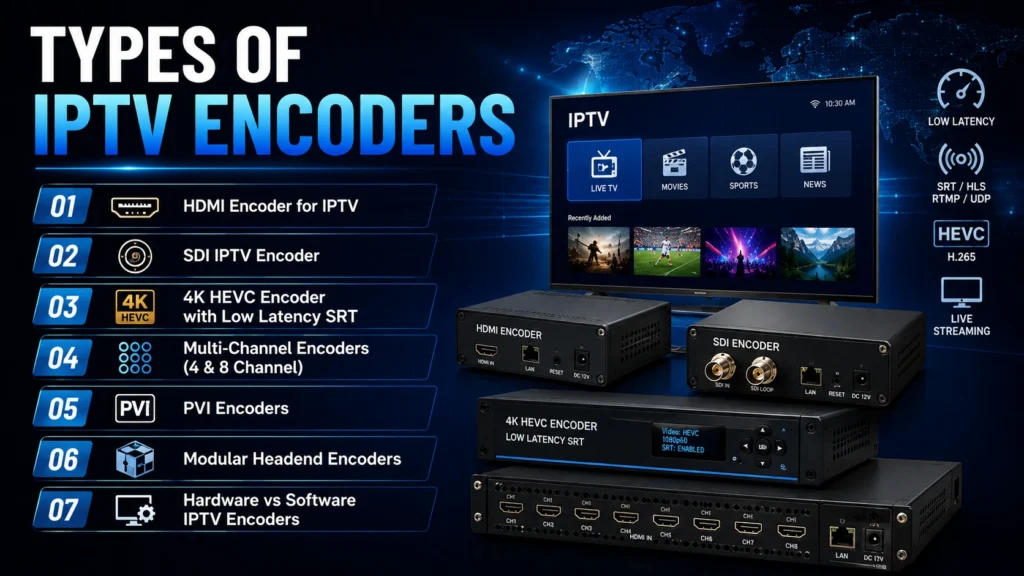
HDMI Encoder for IPTV
An HDMI encoder for IPTV is the most common starting point for small setups. It takes an HDMI source a camera, a set-top box, a laptop, a Blu-ray player and converts it into an IP stream. If you’re a church running a live broadcast, a local channel operator, or someone converting an existing HDMI setup into something streamable, an HDMI to IPTV encoder is usually your entry point. Most modern units are compact, often rack-mountable, and many now support 4K input even at the lower end of the price range.
SDI IPTV Encoder
Professional broadcast environments lean toward an SDI IPTV encoder instead. SDI (Serial Digital Interface) is the standard used by broadcast cameras, video switchers, and studio gear because it holds up over long cable runs without the signal degradation HDMI can suffer from. You’ll find SDI encoders in TV studios, sports stadiums, and outside broadcast trucks, where reliability over distance is more important than plug-and-play convenience.
A lot of professional-grade units now combine both, an HDMI and SDI IPTV encoder in one box so operators can switch between source types without swapping hardware.
4K HEVC Encoder with Low Latency SRT
For higher-end deployments, a 4K HEVC HDMI encoder with low-latency SRT support has become the standard setup. HEVC (H.265) compresses video roughly twice as efficiently as H.264, so a 4K stream can go out at a much lower bitrate than 4K H.264 would need — which matters a lot if you’re streaming over a network you don’t fully control. SRT (Secure Reliable Transport) adds encryption and automatic packet-loss recovery on top, which is why it’s become the go-to protocol for sending contribution feeds over the public internet instead of dedicated fiber lines.
Multi-Channel Encoders (4 & 8 Channel)
Larger setups — hotel IPTV systems, multi-camera venues, or providers running many channels off a single headend — usually skip single-channel units entirely and go straight for a 4-channel HDMI IPTV encoder or an 8-channel HDMI encoder for IPTV (M3U8/HLS). These take several simultaneous HDMI or SDI inputs and output each one as its own independent stream, which can be dropped straight into IPTV middleware. An 8-channel HEVC encoder for IPTV headend setup is especially common for hotel and hospitality deployments, since it cuts rack space and power usage compared to running eight separate boxes.
If you’re specifically looking at the best multi-channel IPTV encoder for hotels, this is the category to focus on — most hospitality installs use an HDMI encoder for hotel IPTV systems that supports multi-rate output, so the same feed can be delivered at different quality levels depending on the room’s TV and network setup.
PVI Encoders (With Logo Overlay)
A PVI encoder for IPTV is a more specialized category, generally used for advertising insertion and channel branding. These units can insert logos, watermarks, or scheduled ad breaks directly into a live feed during encoding; an IPTV encoder with logo overlay and multi-rate output is typically a PVI-style unit built for commercial headends rather than small-scale streaming setups.
Modular Headend Encoders
For operators running a full IPTV headend rather than a handful of channels, a modular IPTV encoder headend setup built around HEVC and SRT lets you scale channel count up over time by adding encoding modules rather than replacing the whole system. Encoding is only one piece of the puzzle if you’re starting an IPTV business — middleware, hosting, and content licensing all sit around this same layer.
Hardware vs Software IPTV Encoders
This is one of the first decisions anyone setting up a stream has to make.
Hardware IPTV encoders are dedicated physical boxes with built-in encoding chips. They’re generally more stable for 24/7 operation, deliver lower and more predictable latency, and don’t compete with other software for CPU power. If you’re running a channel that needs to stay up constantly — hotel TV, a commercial headend, a 24-hour live channel — hardware is almost always the better choice.
Software encoders, like OBS or FFmpeg, run on a regular computer. They’re more flexible for graphics overlays, multi-source switching, and custom workflows, but they need dedicated processing power and more hands-on management to stay reliable.
Most professional operations use hardware encoders for the live channel lineup and reserve software encoders for one-off streams or situations that need extra production flexibility.
Key Specs to Check Before Buying an IPTV Encoder
Whether you’re comparing a basic HDMI unit or a full broadcast IPTV encoder, these are the specs that actually matter:
- Input type – HDMI, SDI, or both, depending on what your source equipment outputs
- Codec support – H.264 for wide compatibility, H.265/HEVC for better bandwidth efficiency
- Resolution – 1080p is the baseline; 4K support matters more every year, especially for sports and premium content
- Latency – Look for sub-second latency if you’re streaming anything live
- Protocol support – HLS/M3U8 for broad player compatibility, SRT or RTMP for contribution feeds
- Channel density – A single-channel box for small setups, or a 4/8-channel unit for anything larger
- Network output – Unicast for individual viewer streams, multicast for shared network delivery (a multicast IPTV encoder is usually the right call for hotel or apartment-building deployments where many TVs pull the same channel)
- Build type – A rack-mount IPTV encoder is worth prioritizing for any permanent commercial install, since it keeps cabling and cooling manageable in a server room or headend rack
How Much Does an IPTV Encoder Cost?
Pricing varies a lot depending on channel count, codec support, and build quality:
- Entry-level single-channel HDMI encoders — roughly $150–$500, fine for small live streams, churches, or single-camera setups
- Professional single or dual-channel units with HEVC and SRT — usually in the $500–$1,500 range
- Multi-channel units (4–8 channel) — commonly land in the $1,500–$2,500+ bracket, and a fully-loaded IPTV encoder over $2,500 is typical once you’re looking at rack-mounted, multi-channel, HEVC-capable units built for a real headend
- Modular headend systems — pricing scales with the number of channel modules added, and can run well past $2,000–$3,000 depending on configuration
If budget is the main driver, an entry-level HDMI encoder for IPTV covers most small projects fine. If you’re running a hotel, a headend, or a broadcast operation, it’s usually worth paying for the multi-channel, HEVC, low-latency tier instead of trying to scale up cheap single-channel units later.
Popular IPTV Encoder Brands and Models
A few names come up repeatedly once you start comparing options in this space. ProVideoInstruments (PVI) is one of the more recognized names in the professional segment — their Vecaster line covers everything from a single-channel Vecaster HD-H264 HDMI-to-IPTV streaming encoder up to the Vecoder Ultra, a higher-end multi-channel HDMI IPTV encoder built for commercial headends, along with 4K HEVC models marketed as the Vecaster-4K line for higher-resolution deployments. Other established names in the broadcast and hospitality space include Thor Broadcast, J-Tech Digital, and AVMATRIX, each covering slightly different niches — from budget HDMI-to-IP boxes to full rack-mounted broadcast systems.
Rather than chasing a specific brand, it’s usually more useful to match the spec sheet — channel count, codec, latency, protocol support — to your actual use case first, then compare a couple of models within that category.
IPTV Encoder Use Cases
Live streaming and events: A single or dual-channel HDMI encoder with low latency is usually enough for church services, local sports broadcasts, or small live events streamed to an app or website.
Hotels and hospitality: Hotels generally need an IPTV encoder for hotel systems that can push out multiple channels at once with multi-rate output, since room TVs vary widely in screen size and network capability. An 8-channel HEVC unit is the common choice here.
Broadcast and headend operations: TV stations, cable replacement services, and larger IPTV providers typically run SDI-based, multi-channel, modular encoders capable of HEVC and SRT, built to run 24/7 without dropouts.
Advertising and branded channels: Anywhere a provider needs to insert logos, watermarks, or ad breaks into a live feed, a PVI-style encoder with overlay support handles that at the encoding stage rather than downstream.
Frequently Asked Questions About IPTV Encoders
-
Do I need a special device to use IPTV?
No, an encoder is only needed if you’re creating or broadcasting a stream, not watching one. If you’re just watching IPTV channels, you only need a player app or set-top box on your TV, phone, or Firestick.
-
What’s the difference between an HDMI and SDI IPTV encoder?
An HDMI encoder is built for consumer and prosumer sources like cameras, set-top boxes, and computers, and works over shorter cable runs. An SDI encoder is built for professional broadcast equipment and holds signal quality over much longer distances, which is why it’s standard in TV studios and outside broadcast setups.
-
Is a hardware or software IPTV encoder better?
For anything running continuously, a live channel, a hotel system, a headend, a hardware encoder is more reliable and has lower, more consistent latency. Software encoders like OBS make more sense for occasional streams where flexibility matters more than 24/7 uptime.
-
What internet speed or bandwidth does an IPTV encoder need?
It depends on resolution and codec. An HD H.264 stream typically needs 4–8 Mbps of stable upload bandwidth, while a 4K HEVC stream can run efficiently at 15–25 Mbps thanks to better compression, compared to what a 4K H.264 stream would require.
-
How many channels can one IPTV encoder handle?
It depends on the unit. Basic models handle a single channel, while multi-channel units commonly support 4 or 8 channels simultaneously from one box, which is standard for hotel and headend deployments.
-
Where can I buy an IPTV encoder?
Encoders are available directly from manufacturers like ProVideoInstruments and Thor Broadcast, as well as through AV equipment resellers such as Markertek and J-Tech Digital. For anyone searching for an IPTV encoder nearby, most professional AV integrators and broadcast equipment suppliers carry or can order hardware encoders locally.
Final Thoughts
An IPTV encoder is the piece of hardware that makes everything else in an IPTV setup possible; no matter how good your middleware, app, or playlist is, none of it works without a clean stream coming out of the encoder first. Whether you’re setting up a single HDMI camera feed or building a multi-channel headend with 4K HEVC and SRT, matching the encoder’s input type, codec support, and channel count to your actual source equipment is what makes the rest of the setup run smoothly.

One Response